

Good news! More detail on the changes to Microsoft Copilot this year.

Allan Carton, 12 November 2026

What has changed in Microsoft Copilot this year - a guide for UK law firms from Carton & Co

If you tried Microsoft Copilot before and set it aside - disillusioned by first early trials or waiting until the tools fit together better - the changes this year are good news. Microsoft has rebuilt much of Copilot over the last nine months or so and added legal skills.

Talk to us

We don't see Copilot as a complete legal platform, but it increasingly provides a capable and appropriate base to build on and around. It still has limitations that any firm has to cater for and it keeps changing - so your IT team have a lot to do to keep up.

These are the changes worth knowing about - each with a link to Microsoft's own guidance.

What has changed this year

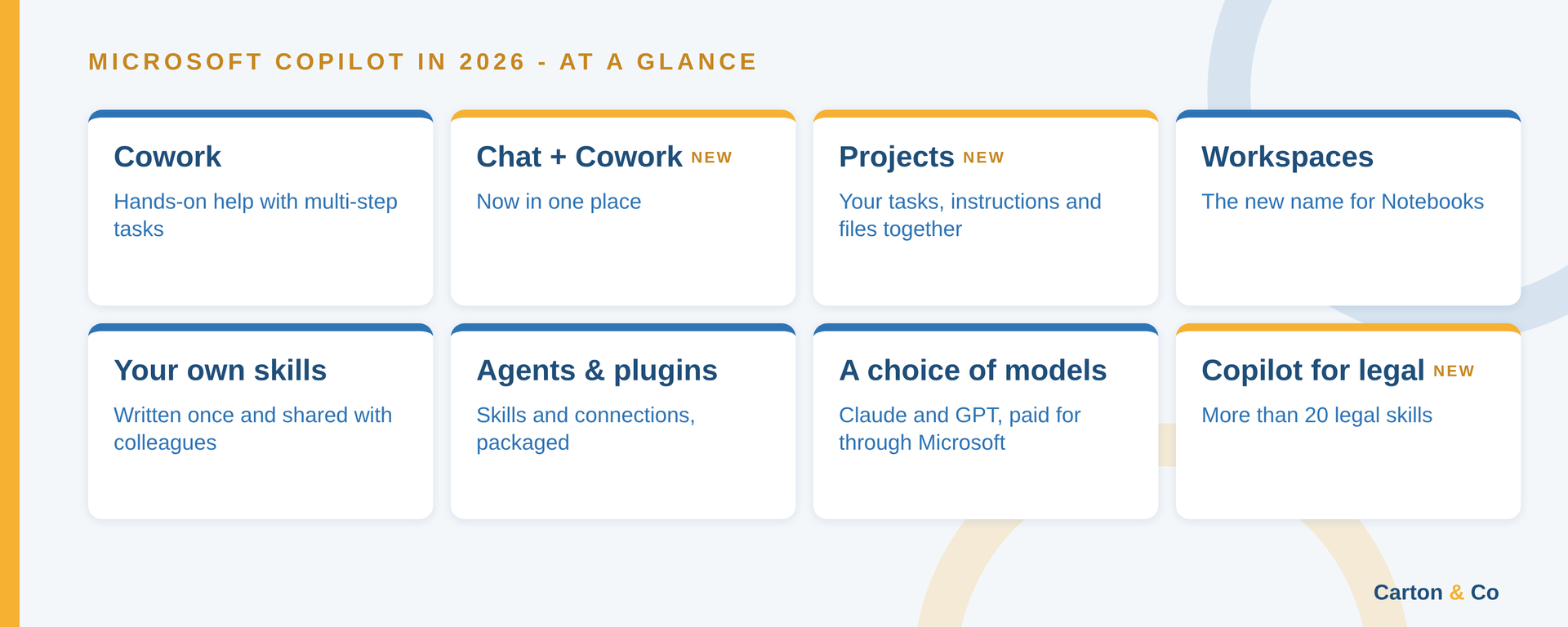
  • Cowork. Generally available since June - you hand Copilot a multi-step task and it works through it to produce finished documents from your files, emails and calendar. More from Microsoft: Copilot Cowork overview.
  • Chat and Cowork are now in one place. New in October - the Copilot app opens on a Home screen where you switch between Chat and Cowork in the same box. More from Microsoft: Copilot Cowork overview.
  • Projects. New in October - a Project keeps related tasks, instructions and the files those tasks produce together. Projects are private to the person who creates them. More from Microsoft: Use projects in Copilot Cowork.
  • Workspaces. Notebooks have been renamed Workspaces - for work you share with colleagues. More from Microsoft: Copilot Notebooks is now Copilot Workspaces.
  • Your own skills. Since April you can write up to 50 skills of your own - since June Copilot talks you through writing one, step by step. You can share a skill with named colleagues and select Re-share when it changes - they all get the latest version. More from Microsoft: Customize Copilot Cowork.
  • Agents and plugins. Plugins arrived in April - a plugin packages skills, connections to other systems or both. Your IT team can deploy plugins for you. A single Agents & Plugins entry now replaces the separate Agents menu. More from Microsoft: Use plugins with Copilot Cowork.
  • A choice of models. Within Copilot you can now use AI models from Anthropic (which provides Claude) and OpenAI (which provides ChatGPT) - new models have been added through the year. You pay Microsoft for them through your Copilot licence and your Cowork usage - no separate subscription to Anthropic or OpenAI. In the UK your administrator decides whether Claude is switched on. More from Microsoft: Claude models from Anthropic in Microsoft Online Services and Choose a model.
  • Cowork is charged by use. Since June Cowork tasks are measured in Copilot Credits - whichever model does the work. Typing /cost in Cowork shows the approximate credits a task has used and how many you have left this month. Paying for AI has become more complicated - licences and usage charges now sit side by side. We have yet to see whether that is a good or a bad thing. More from Microsoft: Check your credit usage for Cowork tasks with /cost.
  • Tasks triggered automatically. Since August a Cowork task can run when something happens - a matching email or a Teams message arriving. More from Microsoft: What's new in Copilot Cowork.
  • Work on your existing documents. Since September Cowork can edit Word, Excel and PowerPoint files where they sit in OneDrive and SharePoint - the version history is kept. More from Microsoft: What's new in Copilot Cowork.
  • The Copilot button has moved. In Word, Excel and PowerPoint it now sits in a corner of the document - right-click it to move it back to the ribbon. More from Microsoft: The Copilot button in Word, Excel and PowerPoint.

Copilot for legal

  • More than 20 legal skills. Generally available since mid-October - the skills include reviewing a contract against your own playbook, checking cross-references and defined terms, explaining tracked changes and building a chronology. More from Microsoft: Introducing Microsoft Copilot for legal.
  • In Word and in Cowork. In Word desktop the legal skills are switched on by default if you have a Microsoft 365 Copilot licence. In Cowork you add the legal plugin first. More from Microsoft: Manage Copilot for legal.
  • Microsoft openly recognises its limitations. The skills were tested primarily in US English and are not jurisdiction-aware by default - expect a US starting point and have a lawyer check the output. They work from the knowledge and expertise you supply in your own playbooks and precedents - you can build on them here in the UK. More from Microsoft: Copilot for legal: transparency documentation.

What comes next

These changes make Copilot worth a fresh look. Your own legal knowledge and skills can be adopted and applied as legal skills - written up as your own skills in Cowork alongside Microsoft's. More from Microsoft: Customize Copilot Cowork.

For practical ideas on using skills and other tools - in Copilot and in other AI systems - see our post Getting results from AI: giving lawyers a better steer. Our AI adoption page sets out how to capture your lawyers' knowledge and build it into an AI adoption roadmap.

We can help you review how Copilot can support your firm alongside other tools - for the legal work and more widely across the practice in business operations, administration, finance and HR.

Book a call with Carton & Co

Bookmark this page (Ctrl+D, or Cmd+D on a Mac) and keep an eye out here. We'll add further information as it becomes available.

About the author

Allan Carton is a solicitor with experience in practice and more than 30 years advising law firms on choosing and adopting legal technology, now including AI. He works with managing partners, lawyers and IT teams as a catalyst to help translate legal and technical requirements into workable legal and business services.

Two lawyers and an IT colleague reviewing a workflow map and laptop together in a law firm office
by Allan Carton • 3 November 2026
How law firm management teams can give lawyers a better steer on AI: knowledge tools, lawyers and IT working together, an AI Steering Group and use cases.
Magnifying glass over Microsoft 365 apps and plans, for a guide to Microsoft 365 plans and Copilot for lawyers
by Frank Manning • 26 October 2026
UK guide for law firms to Microsoft 365 plans and prices, Copilot options and permissions and when to use OneDrive or SharePoint. Updated October 2026.

Technology options selection - full spectrum of legal technology
by Allan Carton & Frank Manning • 8 September 2026
How law firms choose and implement case and practice management systems: the steps, full costs, risks and AI. A practical guide from Carton & Co.

Four levels of AI review for law firms from human-led co-intelligence to agentic AI
by Allan Carton • 29 March 2026
How AI oversight in law firms is moving from lawyers checking outputs to supervising agents. The four levels firms need to understand.
Magnifying glass over a webpage highlighting
by Allan Carton • 3 December 2025
Microsoft licensing changes give law firms under 300 people Copilot and Purview data protection. What's now included and what to check first.

Man and gear symbol with
by Allan Carton • 2 December 2025
Discover practical steps for SME law firms to move from AI experimentation to a secure, strategic approach - empowering teams and ensuring compliance.

Family with parents age 35 to 60, their parents and children - conveyancing best prospects
by Allan Carton • 29 October 2025
A free presentation for law firms on winning more residential conveyancing clients from the best prospects, for your planning and team training.

Three colleagues collaborating around a laptop in an office. They are smiling.
by Allan Carton • 15 October 2025
NatWest’s 2025 Legal Report reveals key benchmarks and trends law firm leaders can use to boost profitability, productivity, and strategic growth.
Three people in an office looking at a laptop with cityscape backdrop.
by Allan Carton • 13 October 2025
Our Smarter Working Project helps law firms improve how people work, deliver more of what clients value and manage the business more effectively.

A crossword puzzle with the words support value service and loyalty
by Allan Carton • 12 October 2025
Client listening for law firms: a practical guide to hearing what clients value, strengthening relationships and developing your services and people.